
Dictionary
Definition of...
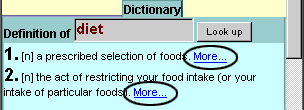
The handiest part of LookWAYup is a one-click lookup of the dictionary definition of the term. First, the term is reduced to singular or present tense. If the word is spelled slightly incorrectly and the correct word is obvious (to a computer), it will just look up that word. For some misspellings it will provide a range of words to choose from.
If a term can have several meanings, all are listed. When LookWAYup is reasonably sure which is the correct meaning in this context, it will often show it first and will often expand its synonyms and related terms.
The part of speech is shown in square brackets:
[n] noun
[v] verb
[a] adjective
[r] adverb
[c] conjunction
[e] preposition
[p] pronoun
[t] article
[i] interjection
[f] affix (prefix or suffix)
Translation
If you're using one of the translation dictionaries rather the English dictionaries, LookWAYup will show you possible translations of the word in green, in addition to most of the features of the English dictionary. Where a word has more than one sense tt doesn't just give a list of possible translations of the word, it gives the translations of the specific sense of the word next to the definition of that sense of the word.
Expand Thesaurus
Clicking on the small magnifying glass icon will expand the
thesaurus entries for this sense of the word. If this thesaurus section is already
visible, clicking on the magnifying glass icon will hide it out of your way.
It lets you explore relationships between words and concepts.
This is like no thesaurus you'e ever seen. It gives you synonyms, terms having exactly the same meaning.
It gives you broader (more general) and narrower (more specific) terms. But it goes much further.
There are up to 25 different relations possible between words, and these are separated into up to 10 colour-coded groups.
These are the 10 possible groups of relations.
will expand the
thesaurus entries for this sense of the word. If this thesaurus section is already
visible, clicking on the magnifying glass icon will hide it out of your way.
It lets you explore relationships between words and concepts.
This is like no thesaurus you'e ever seen. It gives you synonyms, terms having exactly the same meaning.
It gives you broader (more general) and narrower (more specific) terms. But it goes much further.
There are up to 25 different relations possible between words, and these are separated into up to 10 colour-coded groups.
These are the 10 possible groups of relations.
Synonym
Antonym or Opposite
Broader (more general)
Narrower (more specific)
Part of or Member of
Contains
Component of
Composed of
Made of
Makes
Category or Topic
In this Category
Region, regional usage
In this region
Usage
Examples of usage
Similar
See-also
Verb group
Related Derivation
Pertains to noun
Participle of verb
From adjective
Attribute
Entails
Cause of
Related senses (other senses of the same word that are closely related)
Within a group, some of the relations denote that these words are at a higher level in a hierarchy, some denote a lower level, and some denote they are at the same level, and this represented by little arrow symbols.
Clicking on one of the related words lets you look up that word. Usually it will expand the thesaurus entries for the specific meaning of the word that was related to the previous word. Notice how some of the words are bigger than others? That means that this word, or more precisely this sense of this word is more common. More common means it has been used in books and articles more often with that specific meaning. If you look carefully you can also see that the numbers that enumerate the different senses of the words are different sizes. These sizes also reflect how common is this sense compared to other senses.
Concordance
Which books and articles have we used to determine which senses are most common? clicking on the little book icon lets you look at the actual sentences where these words
were found. This is known as a concordance, and since it is not just the word but the specific sense of the
word, it is a "semantic concordance". Clicking the book icon again will hide it out of your way.
lets you look at the actual sentences where these words
were found. This is known as a concordance, and since it is not just the word but the specific sense of the
word, it is a "semantic concordance". Clicking the book icon again will hide it out of your way.
Look up
Use LookWAYup to look up another word. Just change or type the word in the box, then press the "Look up" button. But there are also easier ways. Is there is a word that you want to look up in the definition or the example sentences and it isn't a link? Simply double-click the word and it will be looked up automatically. If you were using a translation dictionary before, it will also look up the translation.
Compound terms

Term not found
Every now and then, LookWAYup can be stumped. When that happens, you can still use its other tools to look up the word on search engines, or use the "second opinion" feature to find it in other dictionaries. Or you can edit the word. Was it a typo? Too many words? A word made up of two words? Try some reasonable variations.
Bottom of the page
More sensesIf the word has a lot of senses, this links to another page of definitions
PhoneticThere are two ways to check the pronunciation of a word. The first is the pronunciation shown at the page, using the handy CMU phonetic notation. To see the notation explained, click on the "Phonetic" link. The pronunciation section will also give you a list homonyms, other words that are pronounced the same way but spelled differently.
Sidebar/full pageIf you want to leave your main browser page free for browsing, you can get a small version of the dictionary in a handy browser sidebar. If you are using it in a sidebar and want to see it in a full page, you can do that as well.
Intelligent Search
LookWAYup gives you one-click intelligent search using popular search engines and other dictionaries. Click on the bee icon to use LookWAYup's "Apis" search feature. What do we mean by "intelligent search"? If a word has several senses, it will try to search for the correct sense of the word. It can do synonym search - finding documents that don't even use the same word but that mean the same thing. It can do related search, using broader or more specific terms, or terms that are related in some other way, to find pages that don't even contain the term you've highlighted, just a related terms. It can do translation search - finding documents that use the term in another language. Not all possible translations, just the ones having the sense that you intend.
If you've installed one of the LookWAYup plug-ins on your browser, the search is not just for the term that you highlighted, but also for the context of the type of page on which you originally highlighted the word. It can search the entire internet or just the web site you were on. Some of the features mentioned here are for users of the full version only.
Parents and Educators
Like any dictionary, LookWAYup provides definition for some slang and vulgar words. While it is not our policy to censor the English language, some software such as Net Nanny can be configured to filter these out. Most of the search engines that LookWAYup links with have some type of a family filter, including Google, Yahoo, Alta Vista, and Microsoft Live Search. It is up to you to configure these so that objectionable web sites are filtered out.
Webmasters
Put LookWAYup on your web site. It's easy and it's free. Follow this link for details.