A tour of LookWAYup
How to look up words
As we saw earlier, there is a variety of different ways to call LookWAYup
from within your browser depending on how it is installed there, or you can go
to the dictionary page on the LookWAYup site. In most cases you
double-click on a word on any web page to highlight it and then press the
LookWAYup button or select LookWAYup from the right-click menu. Or you can
simply type in the word that you want to look up.
The LookWAYup dictionary panel will appear with all the definitions of the
word, plus other helpful information. If the word that you looked up was
not in dictionary form, for example it's in the plural or the past tense,
LookWAYup will automatically change it to dictionary form, even irregular forms
of the word. LookWAYup also has automatic spelling correction. If
you look up a word whose spelling is not quite right, it will change the
spelling for you. If the spelling is further off, then it might give you a
few choices. Further off still and you may have to select "look harder" to
have it suggest different spellings that are even further away (note: full
version only).
If the definition itself uses a word that you don't recognize, just
double-click on it. Double-clicking looks up a word even if it is not
hyperlinked. Most LookWAYup windows also support drag-and-drop. You
can highlight a word in a different window, drag it and drop it on to a
LookWAYup window and it will look it up for you.
You can also look up 2-word phrases, like "turn out", where the combination
of words has a sense distinct from the senses of the individual words. For
instance "turn in" has its own dictionary entries but "turn left" does not.
Some versions of LookWAYup can look up the translation of words to and from
French, German, Spanish, Dutch, and Portuguese. If a word has more than
one sense, it will show the appropriate translations next to the definition,
with usage examples. If you want to translate the word ``act``, do you mean a law, an
action, a part of a play, behaving, or one of the other senses?
A translation dictionary that doesn't do that is worse than useless, and yet
that' s what most electronic dictionaries do. If you have the full version
and you want to translate in the other direction, from another language to
English, click on the Home icon and you will see a link to translate TO English.
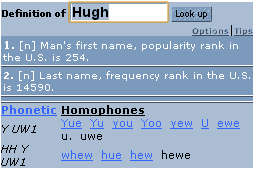 LookWAYup has several ways to let you know how to pronounce words.
It can show it in phonetic symbols, with multiple entries if a word can be pronounced
in different ways. It shows homophones (different words that have the same
pronunciation) that the word can be confused with. There is also a free
plug-in that you can load to pronounce the word through your computer's speaker.
LookWAYup has several ways to let you know how to pronounce words.
It can show it in phonetic symbols, with multiple entries if a word can be pronounced
in different ways. It shows homophones (different words that have the same
pronunciation) that the word can be confused with. There is also a free
plug-in that you can load to pronounce the word through your computer's speaker.
If search is enabled on that version of LookWAYup, you can choose from a list
of search engines and other dictionaries. If you found the word on a web site, you can even search
just the web site
that you're on. The search is even smarter than that. Some versions
can do contextual search, which extracts important words from the context of the
page where the word was found. If you search for "diet" while on a heart
disease site, it will look for other pages dealing with the dietary causes of
heart disease. The "extended search" button will search for synonyms and
related words, to find related web pages even if they don't use the same word.
If you have the full version, you have an even wider range of search options.
You can select from other dictionaries and translators, specialized search
engines, such as kids search, lyrics, legal, encyclopaedia, and classic
literature search, even TV shows.
<< Previous <<
>> Next: Thesaurus >>